Record a month of activity
Enter positive amounts and choose expense, refund, income or transfer. Keep currency and posted, pending or excluded status with each row. Review the period and duplicate rows before using the totals.
Free worksheet + Google Docs guide
Compare monthly category limits with posted spending after refunds.
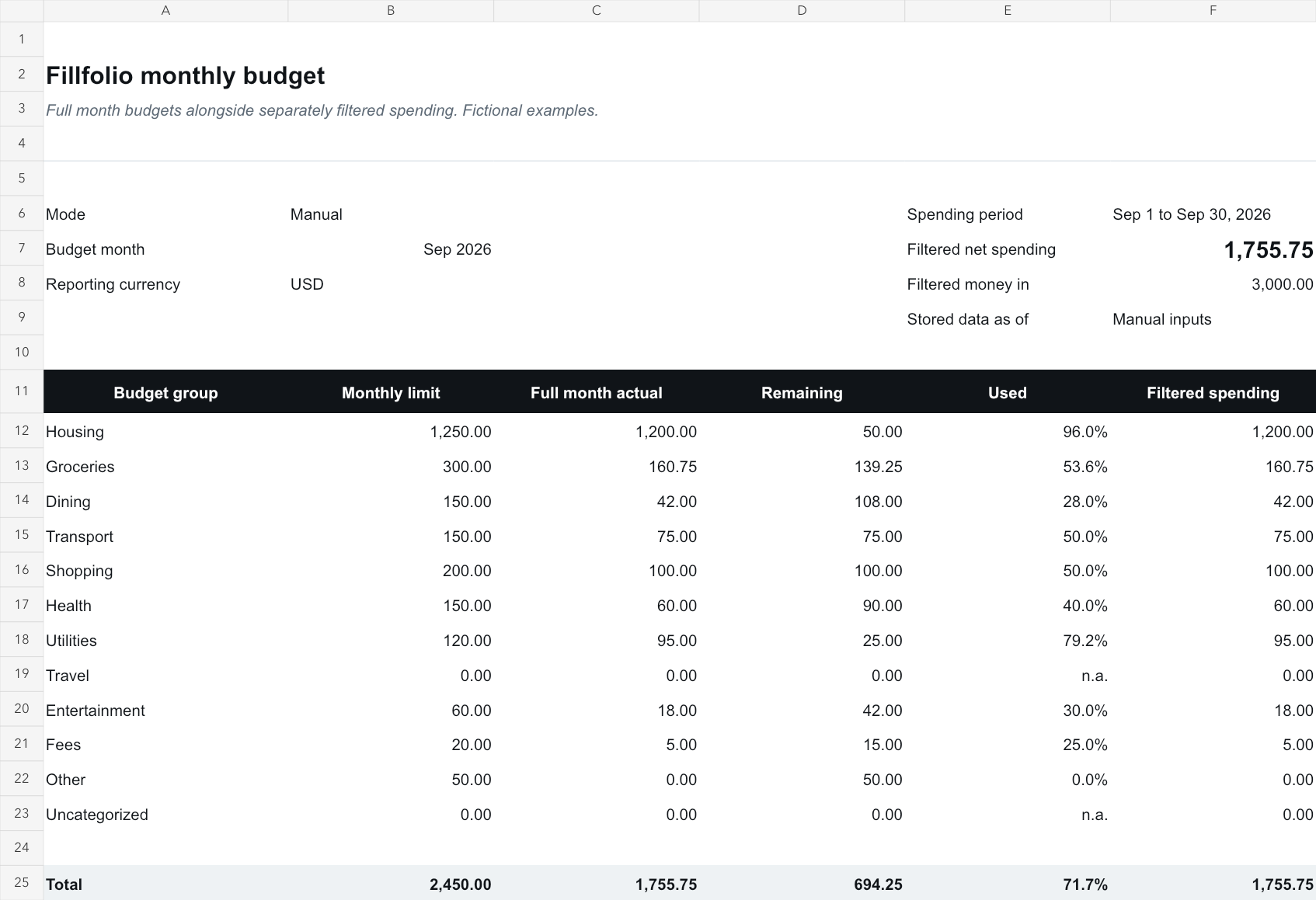
Use the manual worksheet for free with a Google account. The companion guide explains the inputs, checks and optional sync workflow. No Fillfolio account is required for manual entry.
Save a personal copy and check Share settings before entering financial information. Remove the fictional examples before using your own values.
Inside the workbook
Enter positive amounts and choose expense, refund, income or transfer. Keep currency and posted, pending or excluded status with each row. Review the period and duplicate rows before using the totals.
Count posted, nonexcluded expenses as spending and subtract refunds. Review income separately and exclude transfers from spending and income totals. Keep each currency in its own report; money movement between your own accounts is not new income.
Enter category limits for the selected calendar month. Review net spending and remaining budget in the same currency. A zero limit has no useful progress percentage. Refunds can make net spending negative, so retain the signed result.
Optional paid workflow
Optional Spending & Budgets sync requires ULTRA or HYPER, a supported spending-enabled bank and separate approval for this spreadsheet. Use supplied Budgets Actual and Remaining for the full budget month. Spending filters can cover a narrower period, so filtered transactions may not equal budget actuals. In Spending Breakdown choose either Category or Budget group; both describe the same spending.
Install the add-on, open its sidebar in your copy, and approve that spreadsheet in Fillfolio. Sync is manual and one way. It reads stored data and exports full financial values to anyone with access to the spreadsheet. Disconnecting stops future syncs; exported cells and copies remain.
The manual worksheet and companion guide are free. Fillfolio Spending & Budgets sync is an optional paid feature on ULTRA or HYPER with supported spending-enabled banks and separate per-spreadsheet permission.
Enter a positive amount and choose refund. The review subtracts it from posted expenses in the same currency. Do not also enter it as negative spending or count it as income.
No. Sync runs one way from Fillfolio into managed report tabs. Manage connected categories, exclusions and budgets in Fillfolio. Keep personal calculations on separate tabs.
These worksheets help you organize records. Fillfolio does not provide investment, tax or legal advice. Google Sheets™ and Google Docs™ are trademarks of Google LLC.