List the assets and debts you include
Record each account or asset once. Use positive debt amounts, a valuation date and one reporting currency. Separate investment positions from cash so an account total does not duplicate its components.
Free worksheet + Google Docs guide
Create a dated view of assets minus liabilities, with clear coverage.
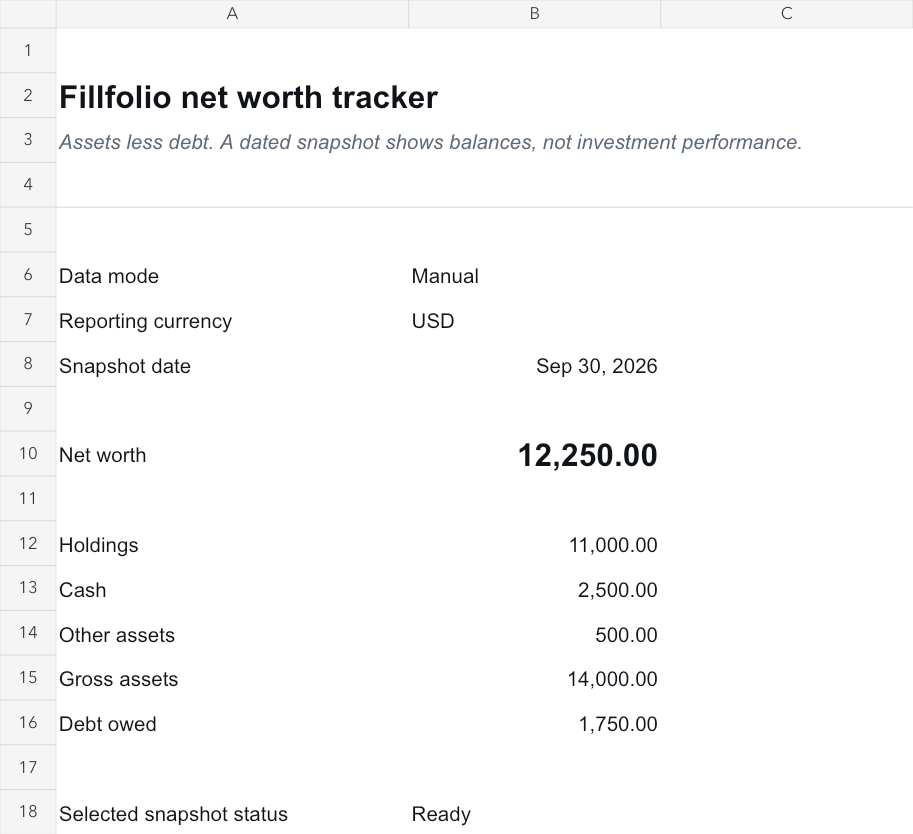
Use the manual worksheet for free with a Google account. The companion guide explains the inputs, checks and optional sync workflow. No Fillfolio account is required for manual entry.
Save a personal copy and check Share settings before entering financial information. Remove the fictional examples before using your own values.
Inside the workbook
Record each account or asset once. Use positive debt amounts, a valuation date and one reporting currency. Separate investment positions from cash so an account total does not duplicate its components.
Add the included assets, then subtract the included debts. Leave unknown balances blank and record what you still need to check. Review account statements and available source dates before describing a snapshot as complete.
Enter a date and copy the reviewed totals as values into a row on Monthly Snapshots. A change between two snapshots may include deposits, withdrawals, debt changes or valuation changes. It does not by itself measure investment performance.
Optional paid workflow
With paid Fillfolio portfolio sync, read Net worth, Gross assets, Holdings market value, Cash value and Debt value by their metric labels in Summary. Gross assets already includes cash; Net worth already subtracts debt. Keep synced totals separate from manual inputs so you do not count the same accounts twice. Retain the exported scope, date, currency and coverage notices.
Install the add-on, open its sidebar in your copy, and approve that spreadsheet in Fillfolio. Sync is manual and one way. It reads stored data and exports full financial values to anyone with access to the spreadsheet. Disconnecting stops future syncs; exported cells and copies remain.
Yes. You can enter balances manually and use the free worksheet without a Fillfolio account. Connected bank cash and debt through Fillfolio require an eligible ULTRA or HYPER plan and supported accounts.
Use one reporting currency for each snapshot and supply known converted values with a recorded basis. Do not add USD and EUR balances directly. Missing conversion inputs leave the affected total incomplete.
Fillfolio updates its managed report ranges. Save reviewed totals as values in a dated Monthly Snapshots row to preserve the earlier observation; formulas pointing to the latest report do not preserve history.
These worksheets help you organize records. Fillfolio does not provide investment, tax or legal advice. Google Sheets™ and Google Docs™ are trademarks of Google LLC.