Is this Notion trading journal free?
Yes. Duplicate it into your own Notion workspace at no cost. It works on Notion's free plan.
Free Notion template
A Notion trading journal you can duplicate in one click and start logging in today. Record each trade's entry, exit, size and setup, and Notion works out the profit or loss.
A stats view adds it up by month: closed trades, win rate, net P/L, average win and average loss. The example trades and tickers are fictional, and there is no sign-up on Fillfolio.
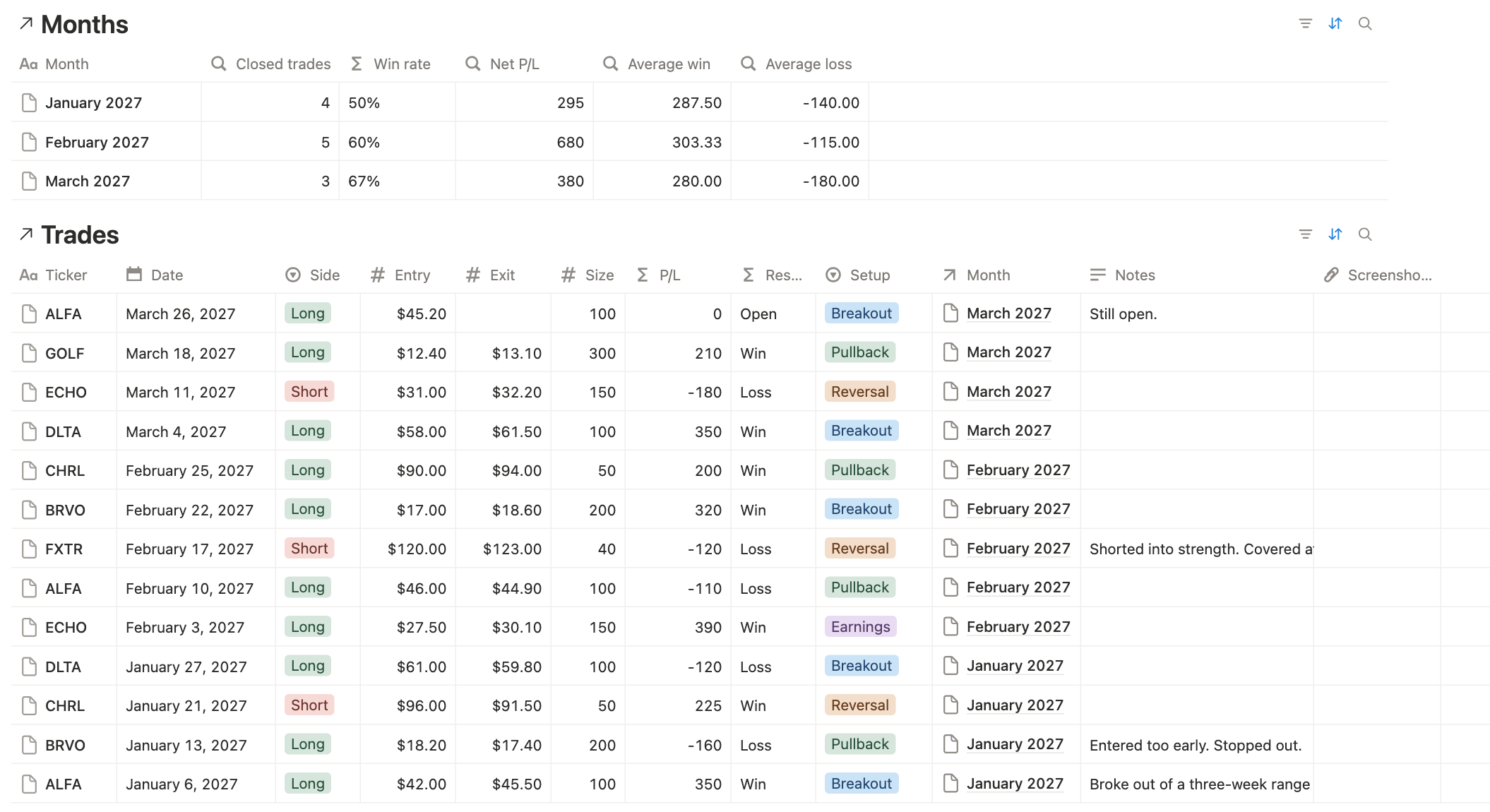
The template is one Notion page with two linked databases. Trades is the log you type into. Months holds one row per month and works out the stats from the trades linked to it.
Open the template and choose Duplicate. Notion adds a private copy to your own workspace. Fillfolio cannot see your copy.
The trades and tickers are fictional. Delete the rows in Trades, and keep or rename the rows in Months.
In Months, add a row for the month you are trading in.
In Trades, add the ticker, date, side, entry price, exit price and size. Leave Exit empty while the trade is open.
Pick the month in the Month column. This link is what fills in the monthly stats.
Choose a setup, add a note on why you entered and how you managed the trade, and attach a chart screenshot.
The Stats by month view is where the template works as a Notion trade tracker. For each month it shows how many trades you closed, the share that were winners, the net profit or loss, the average winning trade and the average losing trade.
Read the last two together with the win rate. A trader who wins four times in ten can still come out ahead if the average win is well above the average loss, and one who wins seven in ten can lose money if it is the other way round.
Open trades are left out of every number until you enter an exit price.
The Setup column is what turns a log into a journal. After a month or two, group or filter the Trade log by Setup and compare the results. The template starts with Breakout, Pullback, Reversal, Earnings and Other; rename them to match how you trade.
It is a plain Notion trading template, so you can add your own properties: fees, a stop price, a planned target, a rating of how well you followed your plan.
| Month | Closed trades | Win rate | Net P/L | Average win | Average loss |
|---|---|---|---|---|---|
| January 2027 | 4 | 50% | $295.00 | $287.50 | -$140.00 |
| February 2027 | 5 | 60% | $680.00 | $303.33 | -$115.00 |
| March 2027 | 3 | 67% | $380.00 | $280.00 | -$180.00 |
Fictional trades and tickers. Over the three months, 7 of 12 closed trades were winners and the net P/L was $1,355.00. A thirteenth trade is still open and is not counted. In the template, P/L and the averages show as plain numbers without a currency sign.
Yes. Duplicate it into your own Notion workspace at no cost. It works on Notion's free plan.
Yes, for any trade you can describe with an entry price, an exit price and a size. For contracts with a multiplier, enter the size as contracts times the multiplier so the P/L comes out in currency.
No. You enter each trade yourself. The template has no broker connection.
Winning trades divided by closed trades in that month. Open trades are left out.
No. Duplicating creates a separate private copy in your workspace. Nothing you type in it is shared with Fillfolio.
Yes. The Screenshots property takes image files, and you can also paste images into each trade's page along with longer notes.
The template uses fictional example data. It is a record-keeping tool, not investment advice, and past results do not predict future results. Fillfolio is tracking software and does not provide financial, tax or legal advice.