Is this Notion finance tracker free?
Yes. Duplicate it into your own Notion workspace at no cost. It works on Notion's free plan.
Free Notion template
An all-in-one Notion finance dashboard: savings, debts, bills, subscriptions, credit cards, net worth and portfolio on a single page. It is a Notion personal finance template you can duplicate in one click.
Each tracker is its own small database with fictional example rows. Use the ones you need and delete the rest. There is no sign-up on Fillfolio.
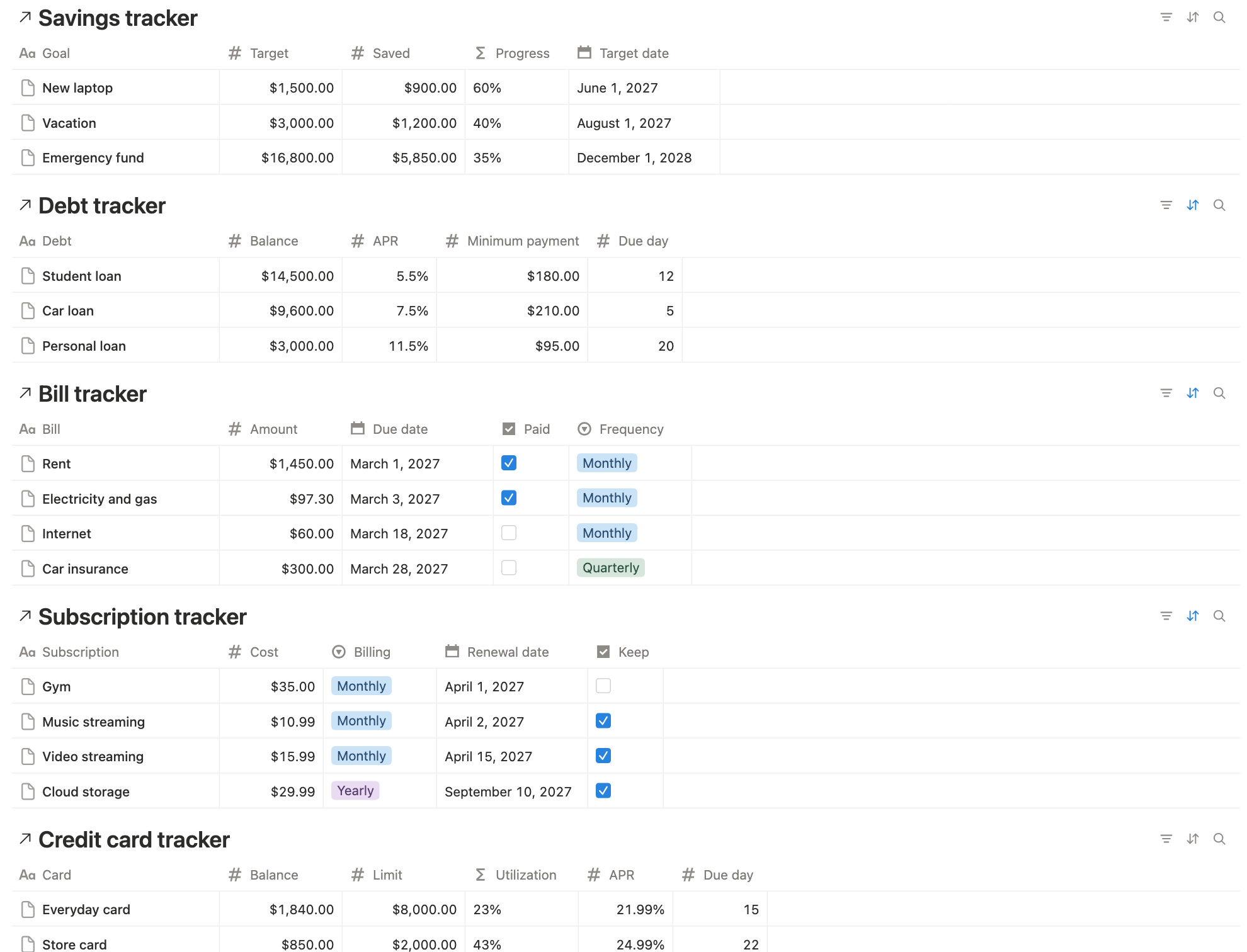
Most Notion finance templates do one job. This one puts seven small trackers on one page, so the things you check once a month sit together. They are separate databases: a balance you type in one does not flow into another, which keeps each one simple to change.
One row for each goal, with a target, the amount saved, a target date and a progress percentage that Notion works out.
One row for each loan: balance, APR, minimum payment and the day of the month it is due. It is sorted with the largest balance first.
One row for each bill, with its amount, due date, how often it comes and a Paid checkbox. It is sorted by due date so the next bill is on top.
One row for each subscription: cost, monthly or yearly billing, the next renewal date and a Keep checkbox for the ones you have decided to stay with.
One row for each card, with balance, limit, APR and due day. Utilization, the share of the limit in use, is calculated.
These two are the trackers people most often outgrow, because the numbers change daily and live in several accounts. The Fillfolio link below is for that case.
A list of what you own and what you owe, grouped into assets and liabilities, with the date each value was last updated. Use Notion's Calculate, then Sum, under the Value column of each group to see the two totals; net worth is assets minus liabilities.
One row for each holding: shares, the price you last checked and your cost basis. Gain shows the percentage difference between the current value and what you paid. Prices are typed in; Notion does not look them up.
Open the template and choose Duplicate. Notion adds a private copy to your own workspace. Fillfolio cannot see your copy.
Delete the databases you will not use. Each one is independent, so nothing breaks.
The rows are fictional. Delete them and add your own goals, debts, bills, subscriptions, cards, accounts and holdings.
Change balances, saved amounts, values and prices. Tick bills as you pay them.
Hover under a number column, choose Calculate, then Sum. Notion remembers the choice in your copy.
| Savings | Three goals: 35%, 40% and 60% of the way there |
| Debts | Three loans totalling $27,100.00 |
| Bills | Four bills in March 2027, two of them paid |
| Subscriptions | Four subscriptions, one marked not to keep |
| Credit cards | Two cards at 23% and 43% utilization |
| Net worth | $39,671.35 in assets and $29,790.00 in liabilities: $9,881.35 |
| Portfolio | Four holdings worth $16,800.00, with gains from -8.3% to 14.3% |
Fictional numbers. The portfolio value and the net worth totals are not shown as rows in the template; they are the sums of the example values.
Notion is good at lists you glance at and tick off. It is weaker at maths across lists: a debt payoff schedule, a month-by-month budget or a net worth history with a chart. For those, the free spreadsheet templates linked below go further, and the Notion budget and expense tracker templates cover spending.
Yes. Duplicate it into your own Notion workspace at no cost. It works on Notion's free plan.
No. They are separate databases on one page. That keeps each one easy to change or delete, but a balance you update in one place is not copied to another.
No. You type every number yourself. The template has no bank or broker connection and does not look up prices.
The free Notion budget template is a separate page built for that, with spent and remaining for each category. Duplicate both and keep them side by side in your workspace.
No. Duplicating creates a separate private copy in your workspace. Nothing you type in it is shared with Fillfolio.
Edit each number property in Notion and pick another number format.
The template uses fictional example data. Fillfolio is tracking software and does not provide financial, tax or legal advice.