Is this bill tracker template free?
Yes. The Google Sheets copy, the Excel file and the Google Docs guide are free, with no sign-up. You copy the file to your own Google Drive or download it.
Free spreadsheet + Google Docs guide
A free bill tracker template for Google Sheets, with an Excel download. List your bills once, mark each one paid as the months go by, and see at a glance what is overdue, what is due soon and how much is left to pay.
Use it as a free bill pay template or bill payment template: the paid marks, due dates and totals are already set up. It comes in a classic color theme and a pastel one, if you would like a cute bill tracker template, plus a printable checklist and a Google Docs guide.
Save a personal copy and check Share settings before entering financial information. Remove the fictional examples before using your own values.
This bill tracker spreadsheet has one list you fill in and three views that read from it. The blue cells are yours; the rest is calculated.
Use the copy button on this page. Google asks you to confirm, then saves a private copy to your Drive. Nothing you type is shared with Fillfolio.
On the Bill List tab, replace the fictional example rows. Enter each bill's name, category, amount, the day of the month it is due and whether it is on autopay.
The year at the top of the Bill List starts on the current year. Type another year to plan ahead.
On the 12 Months tab, pick Paid in the month's column when you pay a bill. For a bill that is not due every month, such as annual insurance, pick Skip in the months it is not due.
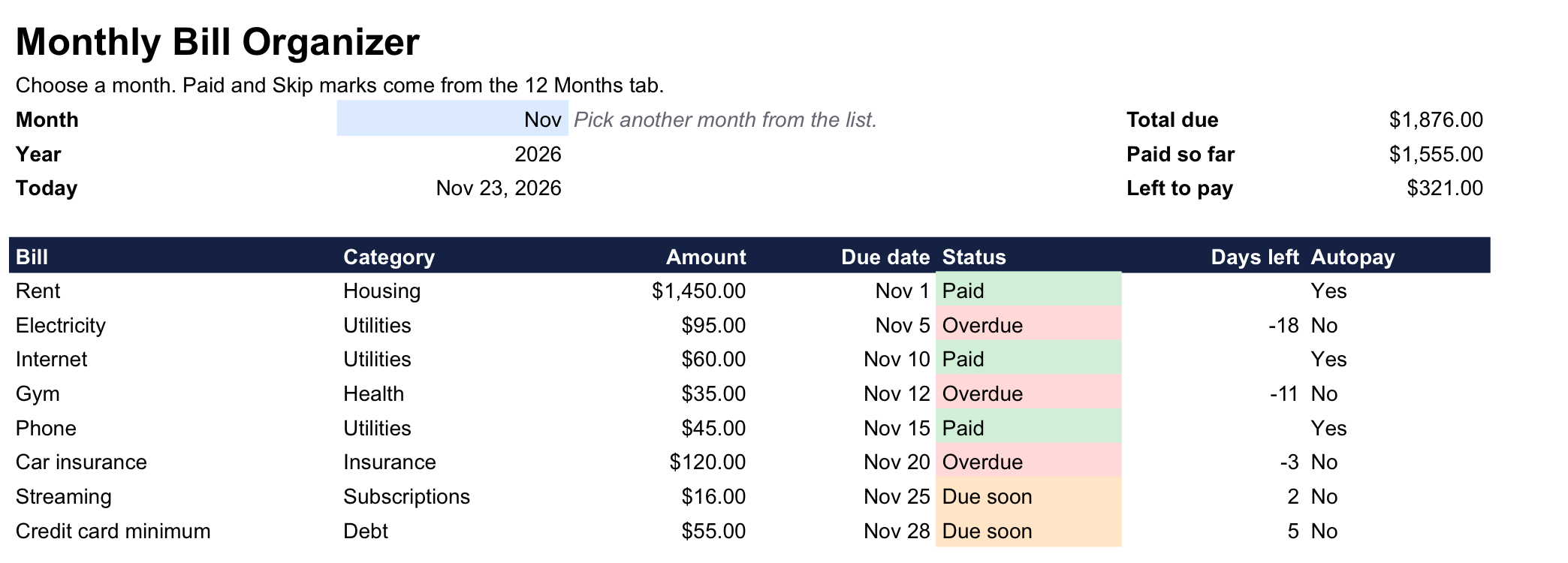
Open This Month. It starts on the current month and shows each bill as Paid, Overdue, Due soon, Upcoming or Not due, with the total due, paid so far and left to pay.
The This Month tab is the monthly bill organizer. Pick a month from the list and it puts every bill in one table with its category, amount, due date and status.
The colors update on their own as the days pass. A bill turns red when its due date has passed without a Paid mark, amber when it is due within 7 days and green once it is paid. Days left counts down to each due date.
Each bill has a due day, and the sheet turns it into a real date for the month you are looking at. In a shorter month, a bill due on the 31st falls on the last day.
Marking a bill takes one click: pick Paid from the list in that month's cell. The sheet then adds up what is due, what you have paid and what is left, for the month and for the year. Skipped months are left out of the total due.
The 12 Months tab shows the whole year as a grid: one row for each bill and one column for each month. Paid cells turn green, so a missed month stands out as a gap in the row.
Under the grid are three rows of totals for every month: due, paid and left to pay. At the end of each row the sheet counts the months paid and the amount paid for that bill.
The Bill List tab works on its own as a simple list of what you owe each month: bill, category, amount, due day, autopay and notes. It totals your bills per month and per year.
You only type your bills here. The other tabs pick up the names, amounts and due days, so there is one place to change a bill when its price changes.
| Bills | Eight monthly bills, from rent ($1,450) to streaming ($16) |
| Total due each month | $1,876 |
| Marked paid | Rent, internet and phone, all on autopay: $1,555 |
| Left to pay | $321 across five bills |
| Total per year | $22,512 |
Fictional bills. The five unpaid bills show as Overdue, Due soon or Upcoming depending on today's date, so the example looks different on different days of the month.
Set Color theme on the Bill List to Pastel and the headers and input cells change to soft pink and lavender on every tab. Set it back to Classic at any time. The status colors stay the same in both themes.
The Printable tab is a black and white checklist with your bill names, due days and amounts already filled in and an empty box for each month. Print it from Google Sheets or Excel and tick the boxes by hand.
The Excel download is the same workbook saved as an .xlsx file, with the same tabs, formulas, color rules and fictional example. It has no macros. It needs Excel 2019 or later, or Microsoft 365, and also opens in other spreadsheet apps that read .xlsx files.
Everything is calculated inside the file, so it works offline. The statuses use the date on your computer.
Yes. The Google Sheets copy, the Excel file and the Google Docs guide are free, with no sign-up. You copy the file to your own Google Drive or download it.
Up to 30 bills, each with a paid mark for every month of the year.
Yes. Enter the bill once, then pick Skip on the 12 Months tab for the months it is not due. Skipped months are left out of the total due.
It does not send reminders. When you open the file, bills due within 7 days are highlighted in amber and overdue bills in red.
No. The spreadsheet is manual. You mark bills as paid yourself, and nothing is sent to Fillfolio.
Make a fresh copy of your file, type the new year on the Bill List and clear the marks on the 12 Months tab. Your bill list carries over.
The template uses fictional example data. Fillfolio is tracking software and does not provide financial, tax or legal advice.