Is this debt payoff template free?
Yes. The Google Sheets copy, the Excel file and the Google Docs guide are free, with no sign-up. You copy the file to your own Google Drive or download it.
Free spreadsheet + Google Docs guide
A spreadsheet to pay off debt with a plan. List each debt with its balance, APR and minimum payment, add what you can pay on top, and the sheet shows your debt-free date, the total interest and a month-by-month schedule.
This free Google Sheets debt payoff template also downloads for Excel and comes with a Google Docs guide for a monthly review. It handles up to 10 debts, and one switch changes the plan between the snowball and avalanche methods.
Save a personal copy and check Share settings before entering financial information. Remove the fictional examples before using your own values.
You type in one tab, Debts. Every other tab reads from it. The blue cells are yours to fill in; the rest is calculated.
Use the copy button on this page. Google asks you to confirm, then saves a private copy to your Drive. Nothing you type is shared with Fillfolio.
On the Debts tab, replace the fictional example rows. Enter each debt's current balance, its APR and its minimum monthly payment from your latest statement.
Enter the amount you can pay each month on top of all the minimums. Enter 0 to see how long the minimums alone would take.
Enter the first day of the month you start, for example 1/1/2027. Every date in the plan counts from it.
Choose Snowball or Avalanche. The payoff order, payoff month and interest for each debt update next to your list.
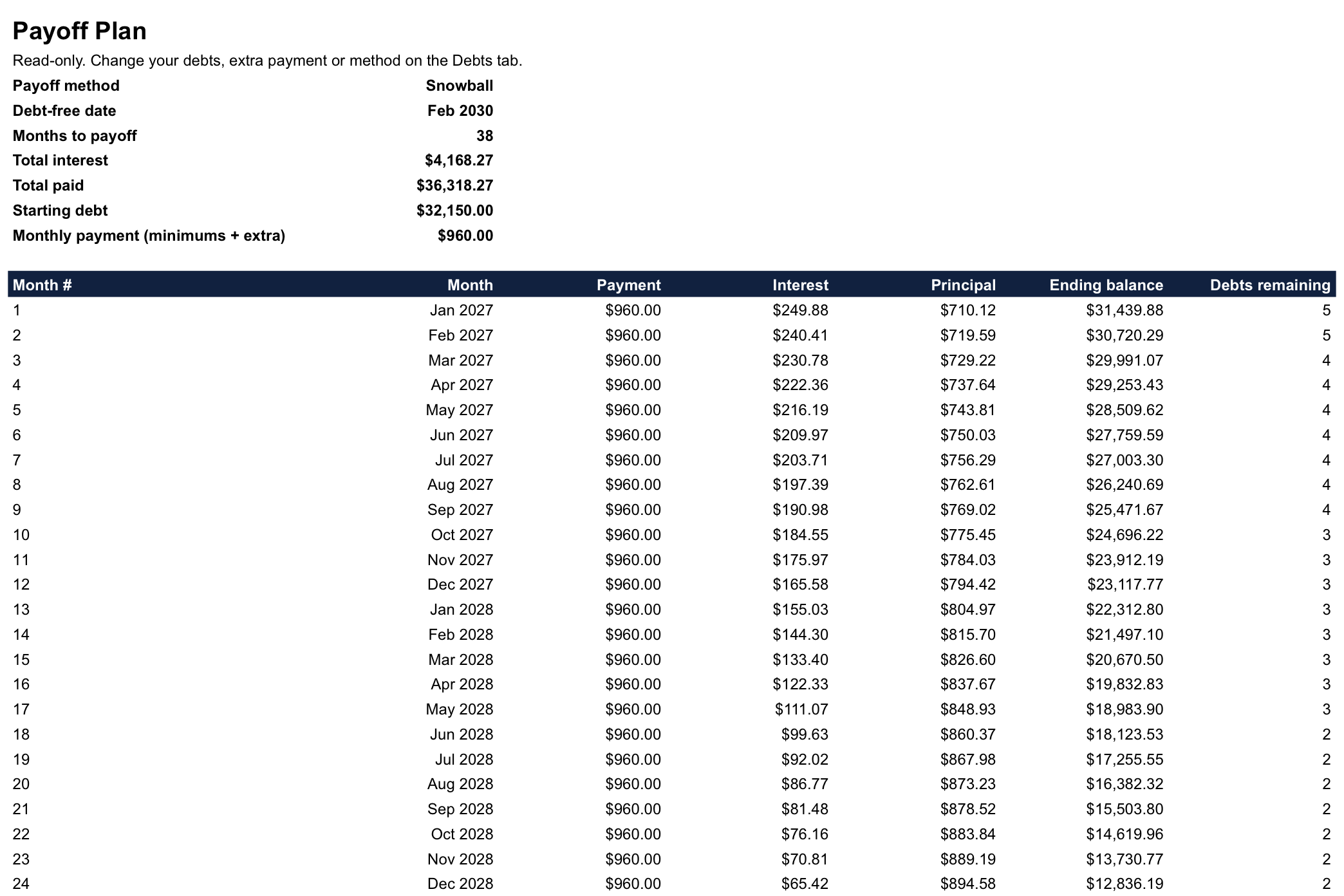
Open Payoff Plan for the debt-free date and total interest. If it says Over 20 years, the payments do not clear the debts in 240 months: raise the extra payment, or check that each minimum is higher than that debt's monthly interest.
Both methods work the same way each month. Every debt gets its minimum payment. Your extra payment, plus the minimums freed by debts you have already paid off, all goes to one target debt. The methods differ only in which debt is the target.
Change the payoff method cell on the Debts tab and watch the debt-free date and total interest on Payoff Plan. The order is set from the balances and APRs you entered and stays fixed for the whole plan. The switch works the same in the Google Sheets copy and the Excel file.
| Snowball | Avalanche | |
|---|---|---|
| Debts | Five debts totalling $32,150 | Same |
| Monthly payment | $660 in minimums + $300 extra = $960 | Same |
| First payment month | January 2027 | Same |
| Second debt cleared | Personal loan, October 2027 | Credit card, February 2028 |
| Debt-free date | February 2030 (38 months) | February 2030 (38 months) |
| Total interest | $4,168.27 | $3,948.87 |
Fictional debts: a store card ($850 at 24.99%), a credit card ($4,200 at 21.99%), a car loan ($9,600 at 7.5%), a student loan ($14,500 at 5.5%) and a personal loan ($3,000 at 11.5%). Both methods clear the store card first, in March 2027, because it has the smallest balance and the highest APR. In this example avalanche costs $219.40 less interest and finishes in the same month.
The Tracker tab turns the plan into a debt tracker spreadsheet. Once a month, type your real total balance in the next blue cell. The sheet shows the planned balance for that month, the difference, the percent of your starting debt paid off and a progress bar that fills as the balance falls.
Use it as a debt tracker template on its own if you only want to record balances, or as a debt payoff tracker in Google Sheets that tells you whether you are ahead of or behind the plan. It has room for 120 months.
The Printable Worksheet tab is a one-page debt sheet with empty rows for creditor, balance, APR, minimum payment, due day, payoff order and notes. Print it from Google Sheets or Excel and fill it in by hand, or use it to gather your statements before you type anything.
The Excel download is the same workbook saved as an .xlsx file, with the same tabs, formulas and fictional example. It has no macros. It needs Excel 2019 or later, or Microsoft 365, and also opens in other spreadsheet apps that read .xlsx files.
Everything is calculated inside the file, so it works offline. The payoff method switch, the schedule and the tracker behave the same as in Google Sheets.
Yes. The Google Sheets copy, the Excel file and the Google Docs guide are free, with no sign-up. You copy the file to your own Google Drive or download it.
Avalanche usually costs less interest because it pays the highest APR first. Snowball clears the smallest debt first, which some people find easier to stick with. Switch the method in the spreadsheet to see the difference for your debts.
Up to 10 debts. The schedule covers 20 years. If the payments would not clear the debts in that time, the plan says Over 20 years instead of showing a date.
Yes. The Excel file has the same tabs and formulas as the Google Sheets copy, including the snowball and avalanche switch, and uses no macros.
The payments do not bring every balance to zero within 240 months. This happens when a minimum payment is lower than the interest charged each month. Raise the extra payment or correct the minimum.
It is an estimate based on monthly interest of APR ÷ 12 and the same payment every month. Your lender's interest method, fees, rate changes and new borrowing will move the real date.
The template uses fictional example data and gives estimates. Fillfolio is tracking software and does not provide financial, tax or legal advice.