Is this credit card tracker free?
Yes. The Google Sheets copy, the Excel file and the Google Docs guide are free, with no sign-up. You copy the file to your own Google Drive or download it.
Free spreadsheet + Google Docs guide
A credit card spreadsheet that keeps every card on one tab: balance, credit limit, utilization, due date and APR. It shows which payment is due next and how much of your credit you are using.
It opens in Google Sheets, downloads for Excel and comes with a Google Docs guide for a monthly review. A payoff tab shows when each card would be cleared at the payment you plan, and a payment log keeps a record of what you paid.
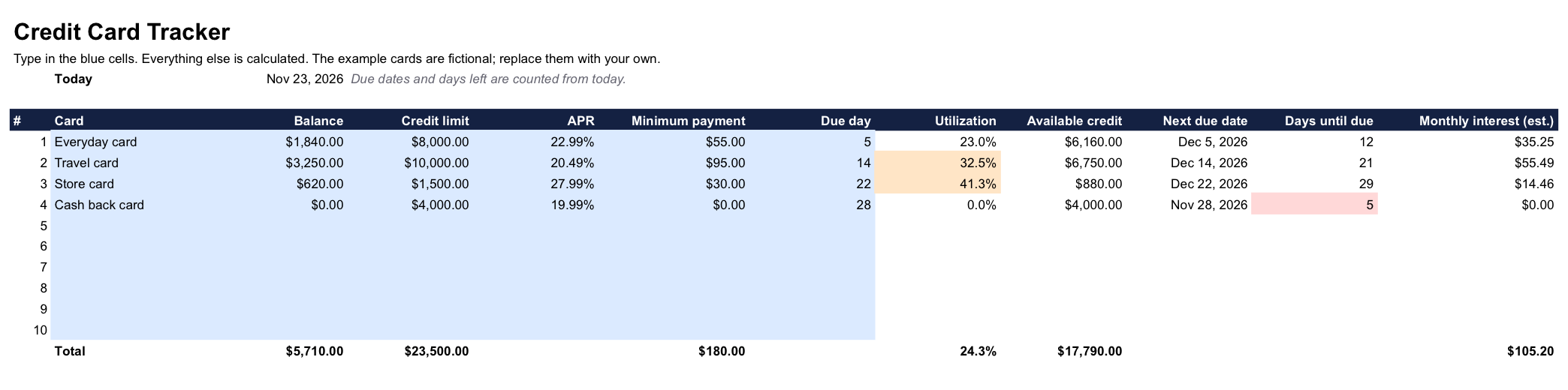
Save a personal copy and check Share settings before entering financial information. Remove the fictional examples before using your own values.
You type in the blue cells on the Cards tab. The rest of the row is calculated from them.
Use the copy button on this page. Google asks you to confirm, then saves a private copy to your Drive. Nothing you type is shared with Fillfolio.
On the Cards tab, replace the fictional example rows. Enter each card's name, current balance, credit limit, APR, minimum payment and due day from your latest statement. There is room for 10 cards.
Read the utilization for each card and for all cards together, then the next due date and the days left. Highlighted cells are the ones to look at first.
Open the Payoff tab. Enter the first payment month and the amount you plan to pay each month. The sheet shows the months to pay off, the payoff month and the total interest.
When you pay a card, add a row to the Payment Log with the date, the card and the amount. The log totals what you have paid on each card.
After each statement, type the new balances on the Cards tab. The payoff figures update with them.
The Payoff tab reads each card's balance, APR and minimum payment from the Cards tab. You enter one number per card: the payment you plan to make every month. It works the same in the Google Sheets copy and in the Excel file.
For each card it shows the months to pay off, the month the balance reaches zero, the total interest and the total paid. A Check column warns when the planned payment is below the minimum payment. If a payment would not clear the card in 240 months, the sheet says Over 20 years instead of a date.
To plan several debts together with the snowball or avalanche method, use the debt payoff spreadsheet linked below.
| Card | Balance and limit | Utilization | Planned payment | Paid off in | Total interest |
|---|---|---|---|---|---|
| Everyday card (22.99% APR) | $1,840 of $8,000 | 23.0% | $150 a month | March 2028 (15 months) | $277.61 |
| Travel card (20.49% APR) | $3,250 of $10,000 | 32.5% | $250 a month | March 2028 (15 months) | $456.51 |
| Store card (27.99% APR) | $620 of $1,500 | 41.3% | $100 a month | July 2027 (7 months) | $57.67 |
| All cards | $5,710 of $23,500 | 24.3% | $500 a month | March 2028 | $791.79 |
Fictional cards with a first payment in January 2027 and no new purchases. The template also includes a fourth card with a zero balance and a $4,000 limit, which is counted in the total limit. The travel and store cards are above 30% utilization, so the sheet highlights them.
The Payment Log tab is a simple record of what you paid: date, card, amount and a note. You pick the card from a list of the names you entered on the Cards tab, so the spelling always matches.
Next to the log, the sheet adds up the payments for each card and for all cards. It has room for 200 payments and works in Google Sheets and Excel.
The Excel download is the same workbook saved as an .xlsx file, with the same tabs, formulas and fictional example. It has no macros. It needs Excel 2019 or later, or Microsoft 365, and also opens in other spreadsheet apps that read .xlsx files.
Everything is calculated inside the file, so it works offline. Due dates and days left are counted from the date on your computer.
Yes. The Google Sheets copy, the Excel file and the Google Docs guide are free, with no sign-up. You copy the file to your own Google Drive or download it.
Up to 10 cards on the Cards tab, and up to 200 payments in the Payment Log.
It is the share of your credit limit you are using: the balance divided by the limit. The spreadsheet shows it for each card and for all cards together, and highlights anything above 30%.
No. The spreadsheet is manual. You type the balances from your statements, and nothing is sent to Fillfolio.
Yes. The Excel file has the same tabs and formulas as the Google Sheets copy, including the payoff tab, and uses no macros.
It is an estimate based on monthly interest of APR ÷ 12, the same payment every month and no new purchases. Your issuer's interest method, fees and rate changes will move the real date.
The template uses fictional example data and gives estimates. Fillfolio is tracking software and does not provide financial, tax or legal advice.