Is this biweekly budget template free?
Yes. The Google Sheets copy, the Excel file and the Google Docs guide are free, with no sign-up. You copy the file to your own Google Drive or download it.
Free spreadsheet + Google Docs guide
A free biweekly budget template for people paid every two weeks. Plan each bill against the paycheck that pays it, and see every one of your 26 paydays for the year on one tab.
Some people spell it bi-weekly, or look for a bi weekly budget template. Google Sheets and Excel versions of this one are both here, and it is built around paychecks, not calendar months. It comes with a Google Docs guide.
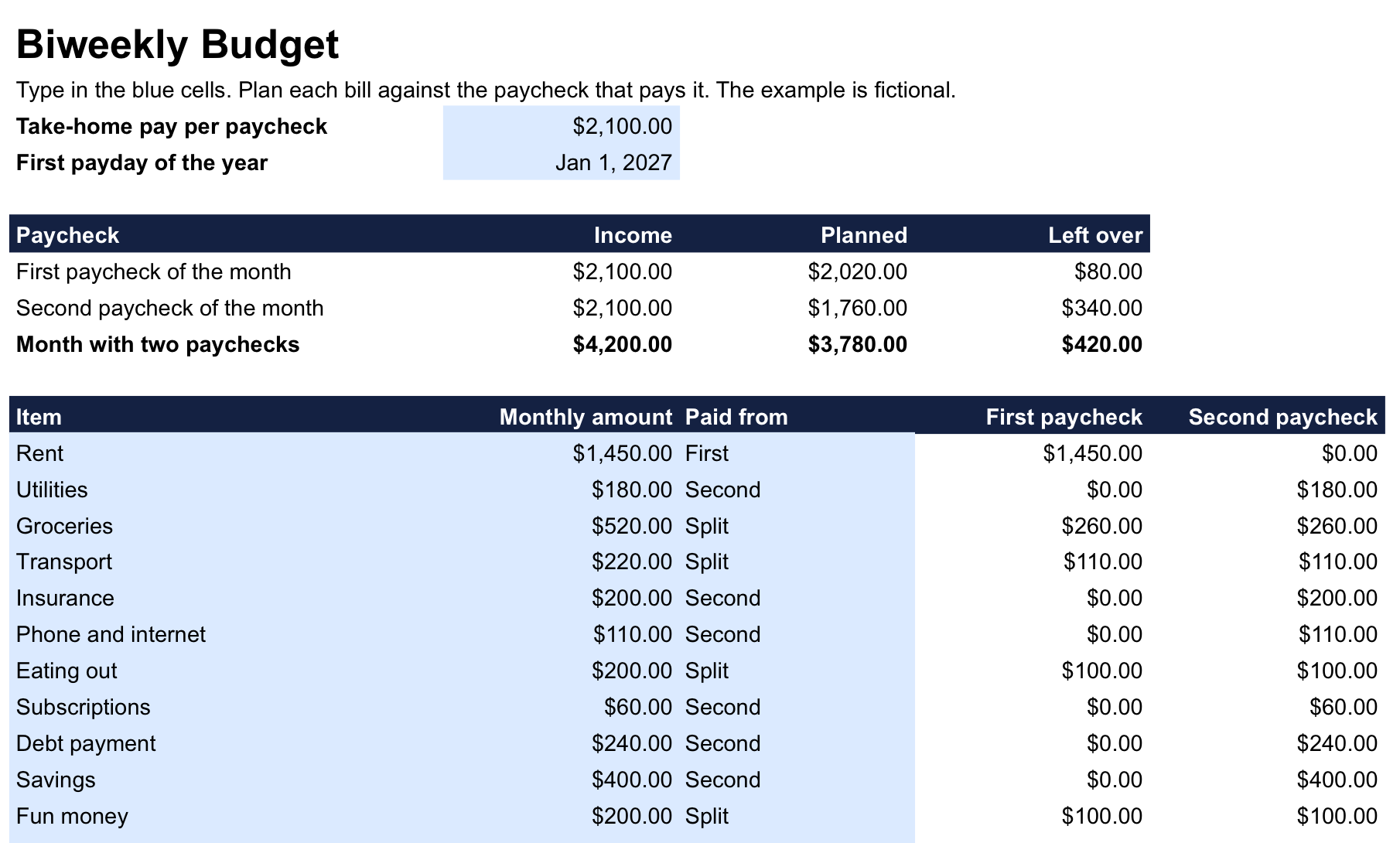
Save a personal copy and check Share settings before entering financial information. Remove the fictional examples before using your own values.
Most bills are monthly, but your pay is not. The Paycheck Plan tab closes that gap: you list each monthly bill once and choose whether the first paycheck of the month pays it, the second one does, or it is split across both.
The summary then shows, for each paycheck, the income, what is planned against it and what is left over. A paycheck that comes up short turns red, so you can move a bill before the month starts.
Paid every two weeks, you receive 26 paychecks a year, not 24. In two months of the year, a third paycheck arrives. The 26 Paychecks tab works out every payday from the first one you enter and marks each third paycheck as Extra paycheck.
No bills are planned against an extra paycheck, because the first two of that month already cover them. That makes it a decision you can take ahead of time: savings, a debt payment or a larger cost.
Use the copy button on this page. Google asks you to confirm, then saves a private copy to your Drive. Nothing you type is shared with Fillfolio.
On the Paycheck Plan tab, type your take-home pay per paycheck and the first payday of the year.
Replace the fictional example lines with your monthly bills and spending.
Pick First, Second or Split. Rent due on the 1st usually belongs to the first paycheck; groceries can be split.
Check what is left over from each. If one is short, move a bill to the other or split it.
On the 26 Paychecks tab, type what you really spent from each paycheck. Difference shows whether you were over or under the plan.
| Income | Planned | Left over | |
|---|---|---|---|
| First paycheck of the month | $2,100 | $2,020 | $80 |
| Second paycheck of the month | $2,100 | $1,760 | $340 |
| Month with two paychecks | $4,200 | $3,780 | $420 |
| Year, 26 paychecks | $54,600 | $45,360 | $9,240 |
Fictional numbers for 2027 with a first payday on January 1. The extra paychecks fall on January 29 and July 30. The $9,240 left over for the year includes those two paychecks, $4,200 in total.
The Excel download is the same workbook saved as an .xlsx file, with the same tabs, formulas, color rules and fictional example. It has no macros. It needs Excel 2019 or later, or Microsoft 365, and also opens in other spreadsheet apps that read .xlsx files.
The 26 paydays are calculated inside the file from the first payday you enter, so it works offline.
Yes. The Google Sheets copy, the Excel file and the Google Docs guide are free, with no sign-up. You copy the file to your own Google Drive or download it.
Biweekly means every two weeks, which gives 26 paychecks a year. Twice a month, on fixed dates such as the 1st and 15th, gives 24. This template is built for every two weeks.
It depends on your first payday. Enter it on the Paycheck Plan tab and the 26 Paychecks tab marks both extra paychecks for that year.
That is your choice. Because the month's bills are already covered by the first two paychecks, many people send it to savings or debt. The template only shows when it arrives.
Assign it to the earlier paycheck, split it, or ask the company to move the due date. The template plans by paycheck; it does not check each due date.
Yes. The Excel file has the same tabs and formulas as the Google Sheets copy and uses no macros.
The template uses fictional example data. Fillfolio is tracking software and does not provide financial, tax or legal advice.