Is this yearly budget template free?
Yes. The Google Sheets copy, the Excel file and the Google Docs guide are free, with no sign-up. You copy the file to your own Google Drive or download it.
Free spreadsheet + Google Docs guide
A free yearly budget template for Google Sheets, with an Excel download. Plan your income and expenses in 12 monthly columns with a year total, so a holiday in July or gifts in December are in the plan from the start.
As the year goes on, type what really happened and the template compares planned vs actual for the months completed so far. It comes with a Google Docs guide for a monthly review.
Save a personal copy and check Share settings before entering financial information. Remove the fictional examples before using your own values.
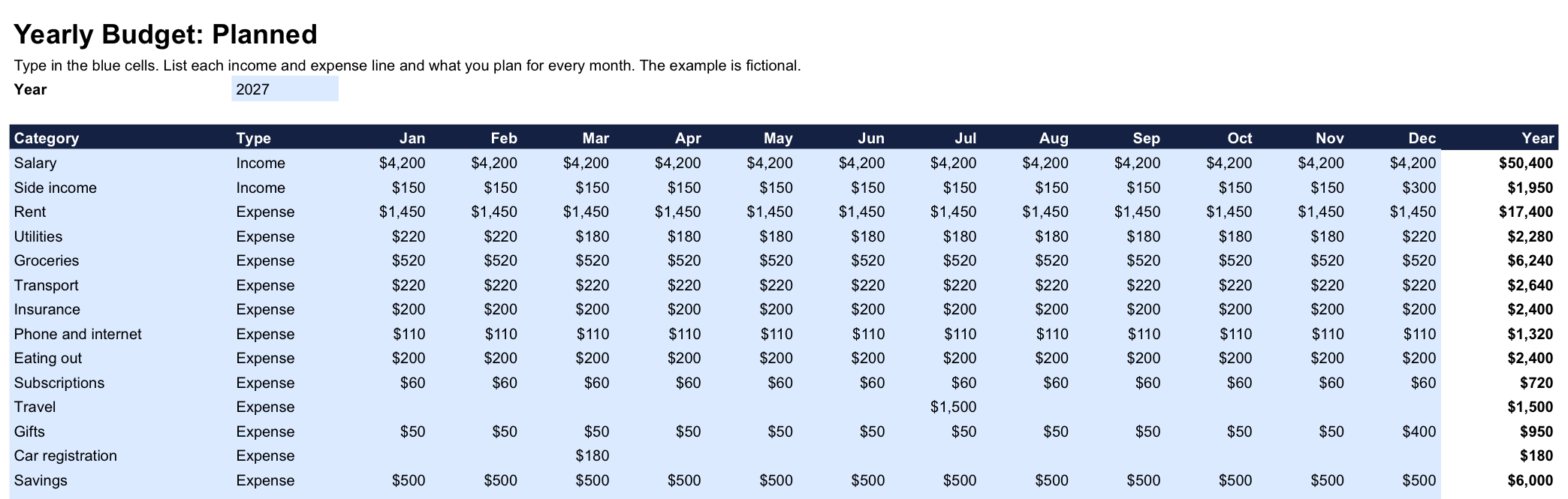
The Planned tab is your annual budget. Each row is one income or expense line, and each column is a month, with the year total at the end. At the bottom, three rows add up total income, total expenses and net for every month and for the year.
Seeing the whole year at once shows what a monthly budget hides: the months where a large cost lands, and whether the months before them leave enough to cover it.
Use the copy button on this page. Google asks you to confirm, then saves a private copy to your Drive. Nothing you type is shared with Fillfolio.
On the Planned tab, type the year and replace the fictional example rows. Add each income and expense line and pick Income or Expense.
Type what you plan for each month. For a cost that stays the same, fill January and copy it across the row.
Put travel, gifts, insurance renewals and yearly fees in the month they fall due. Leave the other months empty.
At the end of each month, type your real income and spending on the Actual tab.
On the Summary tab, type how many months are complete. Each line shows the plan to date, the actual amount to date and the difference.
The Summary tab compares like with like. If three months are complete, it adds up the plan for January to March and the actual amounts for the same three months, not the whole year.
An expense line is On track when you spent the planned amount or less, and Over plan when you spent more. An income line is On track when you earned the planned amount or more, and Below plan when you earned less.
| Planned | Actual | |
|---|---|---|
| Income for the year | $52,350 | |
| Expenses for the year | $44,030 | |
| Net for the year | $8,320 | |
| Income, January to March | $13,050 | $13,050 |
| Expenses, January to March | $10,730 | $10,788 |
| Net, January to March | $2,320 | $2,262 |
Fictional numbers for 2027. July is planned at a loss of $640 because of a $1,500 trip, which the other months cover. After three months, spending is $58 over plan, mostly from eating out.
The Excel download is the same workbook saved as an .xlsx file, with the same tabs, formulas, color rules and fictional example. It has no macros. It needs Excel 2019 or later, or Microsoft 365, and also opens in other spreadsheet apps that read .xlsx files.
Yes. The Google Sheets copy, the Excel file and the Google Docs guide are free, with no sign-up. You copy the file to your own Google Drive or download it.
Yes. Fill in the months that are left and leave the earlier ones empty. The year total then covers only the months you planned.
Type it in the month it is due and leave the other months empty. The monthly net shows whether that month can cover it.
Up to 30 income and expense lines, each with 12 months.
No. You type one total per line for each month. To log purchases one by one, use the monthly budget or the zero-based budget template linked below.
Yes. The Excel file has the same tabs and formulas as the Google Sheets copy and uses no macros.
The template uses fictional example data. Fillfolio is tracking software and does not provide financial, tax or legal advice.