Is this check register template free?
Yes. The Google Sheets copy, the Excel file and the Google Docs guide are free, with no sign-up.
Free spreadsheet + Google Docs guide
A free check register for Google Sheets. Record every check, card payment, withdrawal and deposit, and the register shows your balance after each one.
Mark transactions as cleared when they reach your bank statement, and the register tells you what the bank's balance should be. It works as a checkbook register in Google Sheets, downloads for Excel, prints as a blank paper register, and comes with a Google Docs guide for reconciling each month.
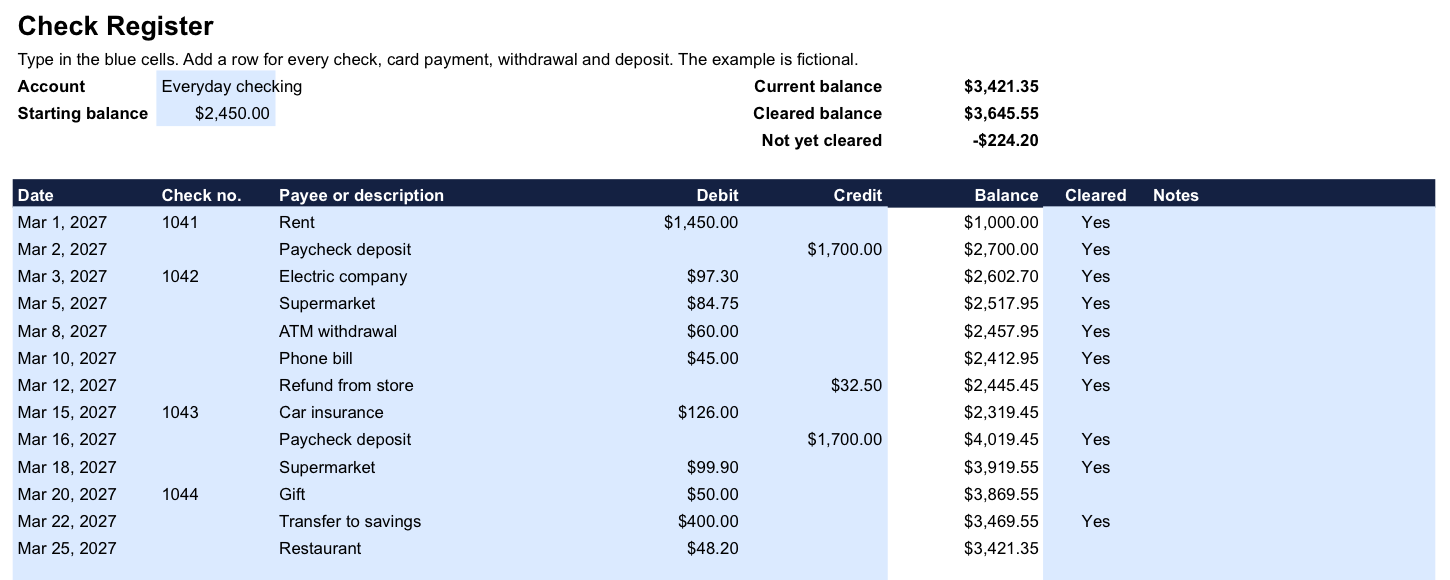
Save a personal copy and check Share settings before entering financial information. Remove the fictional examples before using your own values.
The Register tab has one row per transaction. The blue cells are yours to fill in; the Balance column and the three balances at the top are calculated.
Use the copy button on this page, or download the Excel file. A Google Sheets copy is saved to your own Drive. Nothing you type is shared with Fillfolio.
Type the account name and the closing balance from your latest bank statement.
Replace the fictional rows. Add a row for every check, card payment, withdrawal, transfer and deposit, with the amount in Debit or Credit.
The Balance column shows what is left after each row. A balance below zero turns red.
When a transaction appears on your statement or in your banking app, pick Yes in the Cleared column.
Compare Cleared balance with the balance your bank shows. If they match, the register is correct up to that point.
The register keeps two balances. Current balance counts everything you have recorded, including checks the bank has not processed yet. It is the money you can still spend.
Cleared balance counts only the rows marked Yes. It is the number to compare with your bank statement. Not yet cleared is the difference between the two.
A check you wrote last week may not reach the bank for days. The bank's balance looks higher until it does, and the register stops you from spending that money twice.
| Starting balance | $2,450.00 |
| Credits | $3,432.50: two paychecks and a refund |
| Debits | $2,461.15 across 10 transactions, including four checks |
| Current balance | $3,421.35 |
| Not yet cleared | Two checks and a card payment: $224.20 |
| Cleared balance | $3,645.55, the balance the bank statement should show |
Fictional numbers for March 2027. The three transactions that have not cleared are a $126.00 check, a $50.00 check and a $48.20 card payment. The register shows them as -$224.20, because the bank's balance is that much higher than yours until they clear.
The Printable Register tab is a blank register with the same columns and 32 ruled rows. Print it from Google Sheets or Excel if you prefer to keep the register on paper, or keep a copy with your checkbook and type the rows in later.
The Excel download is the same workbook saved as an .xlsx file, with the same tabs, formulas, color rules and fictional example. It has no macros. It needs Excel 2019 or later, or Microsoft 365, and also opens in other spreadsheet apps that read .xlsx files.
Yes. The Google Sheets copy, the Excel file and the Google Docs guide are free, with no sign-up.
They are two names for the same thing: a list of every transaction in a checking account with a running balance.
It is still useful if you want to know your real balance before the bank catches up, or if you want to check your statement for errors. Card payments, transfers and deposits go in the same register.
The closing balance from your latest bank statement. Then add any checks or payments you made that were not on that statement yet.
Usually a transaction is missing, an amount is typed wrong, a row is marked Cleared too early, or a bank fee or interest payment has not been entered.
Up to 300. Start a fresh copy when the register is full and use the last balance as the new starting balance.
The template uses fictional example data. Fillfolio is tracking software and does not provide financial, tax or legal advice.