Is this conscious spending plan template free?
Yes. The Google Sheets copy, the Excel file and the Google Docs guide are free, with no sign-up. You copy the file to your own Google Drive or download it.
Free spreadsheet + Google Docs guide
A free conscious spending plan template for Google Sheets, with an Excel download. Enter your take-home income, sort your costs into four buckets and see whether each one sits inside its guideline.
The four buckets are fixed costs, investments, savings and guilt-free spending. The template comes with a Google Docs guide for a monthly review.
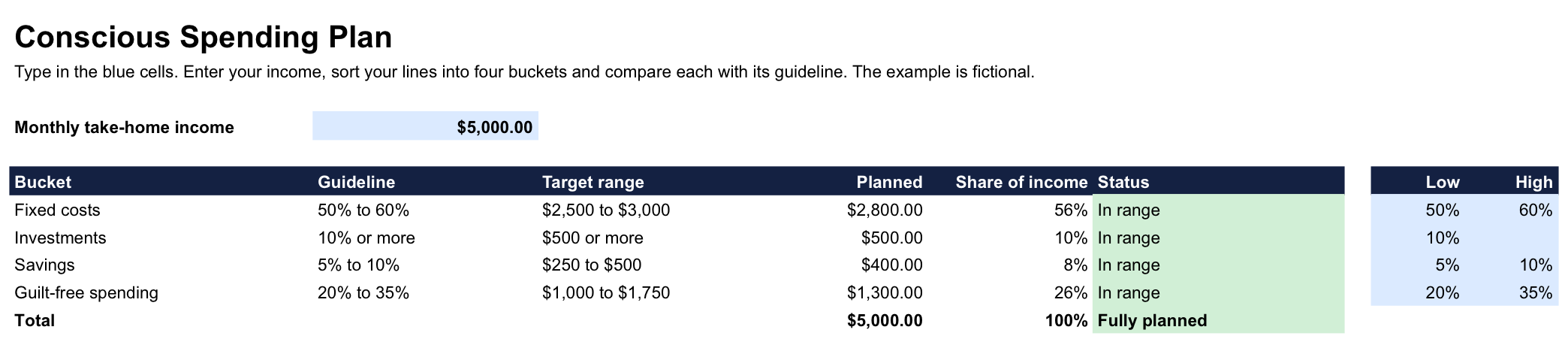
Save a personal copy and check Share settings before entering financial information. Remove the fictional examples before using your own values.
A conscious spending plan is a way of budgeting that decides the big things once instead of tracking every purchase. You cover your fixed costs, set money aside for investing and saving first, and then spend what is left on whatever you enjoy, without guilt.
It is less about cutting back and more about choosing. If the plan says you have $1,300 a month for fun, you can spend all of it, because the important things are already taken care of.
Each guideline is a share of take-home income, the money that reaches your account after tax.
Everything is on one Plan tab. You type in the blue cells; the target ranges, shares and status are calculated.
Use the copy button on this page. Google asks you to confirm, then saves a private copy to your Drive. Nothing you type is shared with Fillfolio.
On the Plan tab, type your monthly take-home income. The dollar range for each bucket appears straight away.
Replace the fictional example lines with your own. Pick a bucket for each and type the amount you plan.
In range means the bucket's share of income is inside its guideline. Above range or Below range means it is outside.
Adjust the lines until the Total row says Fully planned. Whatever is left after fixed costs, investing and saving belongs in guilt-free spending.
The ranges are starting points. Where housing is expensive, fixed costs can run above 60%, and someone paying off debt quickly may hold guilt-free spending below 20% for a while. Type your own percentages in the Low and High cells next to the table and the targets update.
| Bucket | Guideline | Target range | Planned | Share |
|---|---|---|---|---|
| Fixed costs | 50% to 60% | $2,500 to $3,000 | $2,800 | 56% |
| Investments | 10% or more | $500 or more | $500 | 10% |
| Savings | 5% to 10% | $250 to $500 | $400 | 8% |
| Guilt-free spending | 20% to 35% | $1,000 to $1,750 | $1,300 | 26% |
| Total | $5,000 | 100% |
Fictional numbers. All four buckets are in range and the plan uses the full $5,000.
The Excel download is the same workbook saved as an .xlsx file, with the same formulas, color rules and fictional example. It has no macros. It needs Excel 2019 or later, or Microsoft 365, and also opens in other spreadsheet apps that read .xlsx files.
Yes. The Google Sheets copy, the Excel file and the Google Docs guide are free, with no sign-up. You copy the file to your own Google Drive or download it.
It has four buckets instead of three. Investing and saving are separate, and each bucket has a range, not one fixed share.
After tax. Use your take-home pay, the amount that reaches your account.
In fixed costs. They are bills you have to pay each month.
The sheet marks it Above range or Below range. You can adjust your plan, or change the guideline if your situation calls for it.
No. This template plans the month by bucket. To log purchases against categories, use the zero-based budget or the monthly budget template linked below.
The template uses fictional example data. Fillfolio is tracking software and does not provide financial, investment, tax or legal advice.