Is this couples budget spreadsheet free?
Yes. The Google Sheets copy, the Excel file and the Google Docs guide are free, with no sign-up.
Free spreadsheet + Google Docs guide
A free couples budget spreadsheet for two incomes. List your monthly expenses, mark each one as shared or personal, and choose how to split the shared ones: by each person's share of the income, 50/50, or a share you set yourselves.
The sheet shows what each of you pays and what each of you has left over. It opens in Google Sheets, downloads for Excel, and comes with a Google Docs guide for a monthly check-in.
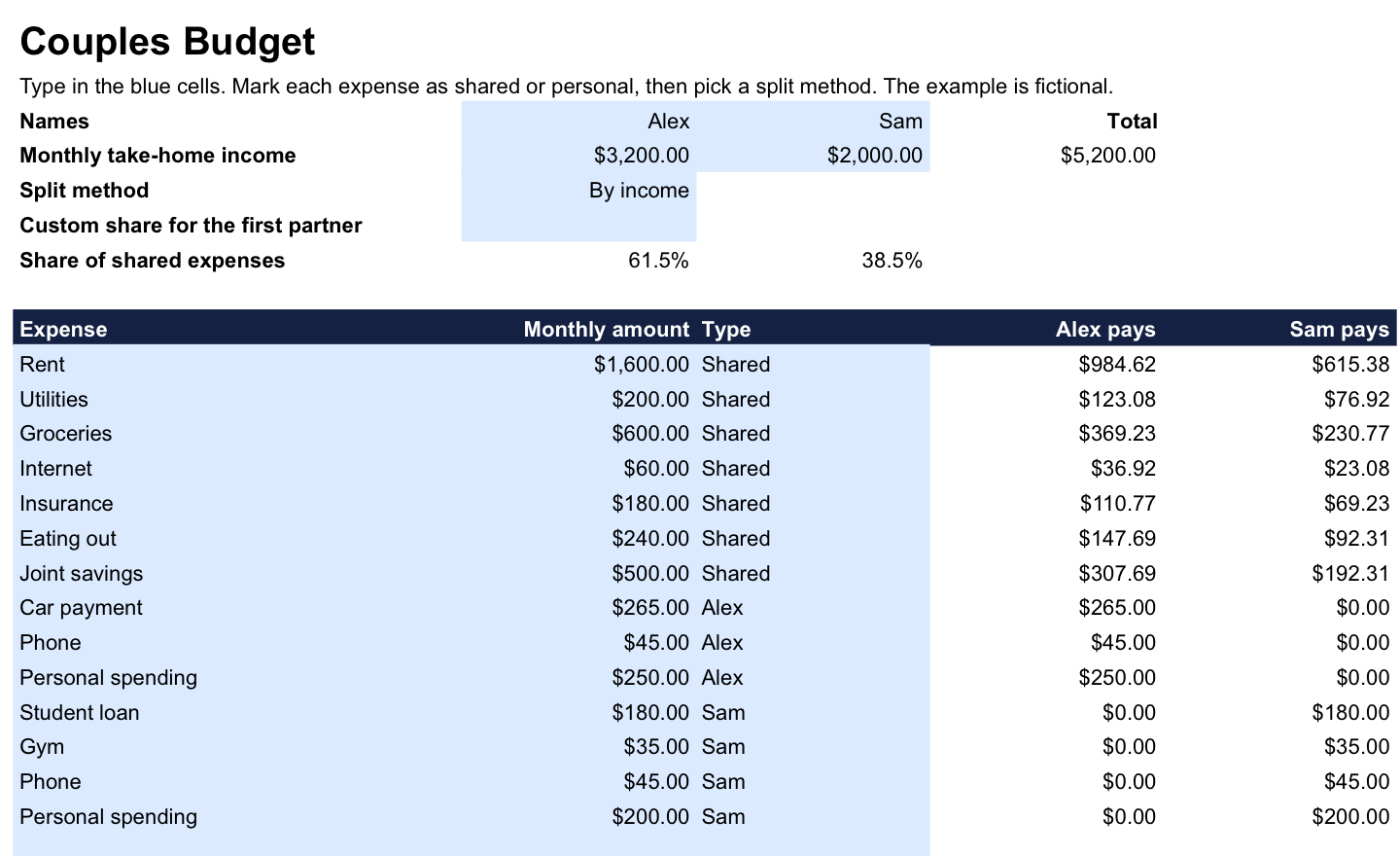
Save a personal copy and check Share settings before entering financial information. Remove the fictional examples before using your own values.
Everything is on one tab, Budget. The blue cells are yours to fill in; the rest is calculated. Type your two names once and they appear in the column headings, the expense types and the summary.
Use the copy button on this page, or download the Excel file. A Google Sheets copy is saved to your own Drive, and you can share it with your partner from there. Nothing you type is shared with Fillfolio.
Type both names and each person's monthly take-home income. Use the amount that reaches the bank account, after tax.
Choose By income, 50/50 or Custom. For Custom, type the first partner's share as a percentage; the second partner pays the rest.
Replace the fictional rows with your own monthly expenses. Include savings you put aside together.
Pick Shared for costs you carry together, or the name of the person who pays the cost alone.
Check what each person pays and has left over. A negative amount turns red.
Switch between the three and compare the Left over row. The spreadsheet shows the numbers for each method; which one is fair for you is your decision.
| Alex | Sam | |
|---|---|---|
| Monthly take-home income | $3,200 | $2,000 |
| Share of the combined income | 61.5% | 38.5% |
| Share of $3,380 in shared expenses | $2,080 | $1,300 |
| Personal expenses | $560 | $460 |
| Left over, split by income | $560 | $240 |
| Left over, split 50/50 | $950 | -$150 |
Fictional names and numbers. Shared expenses are rent, utilities, groceries, internet, insurance, eating out and $500 of joint savings. Split 50/50, each person would pay $1,690 of the shared expenses, which is $150 more than Sam has after personal expenses.
The Excel download is the same workbook saved as an .xlsx file, with the same formulas, lists, color rules and fictional example. It has no macros. It needs Excel 2019 or later, or Microsoft 365, and also opens in other spreadsheet apps that read .xlsx files.
Yes. The Google Sheets copy, the Excel file and the Google Docs guide are free, with no sign-up.
That is for the two of you to decide. Splitting by income leaves each person paying the same percentage of what they earn. Splitting 50/50 is simpler and suits similar incomes. The spreadsheet shows what each person has left over under both.
Yes. The Share of shared expenses row is the amount each person pays into the joint account each month to cover everything marked Shared.
Yes. In Google Sheets, one of you makes the copy and shares it with the other from the Share button. Both of you can then edit the same file.
Enter 0 for the other income. Split by income then assigns all the shared expenses to the person with the income. Use Custom or 50/50 if savings or other money cover the other share.
Up to 30 rows. Group small costs into one row, for example Subscriptions, if you need more room.
The template uses fictional example data. Fillfolio is tracking software and does not provide financial, tax or legal advice.