Is this Notion budget template free?
Yes. Duplicate it into your own Notion workspace at no cost. It works on Notion's free plan.
Free Notion template
A free Notion budget template: free, duplicate in one click, no sign-up. Set a budget for each category each month, log what you spend, and your Notion budget shows what is spent, what remains and which categories went over.
The template has two linked databases, three ready-made views and fictional example rows that show how it works.
The template is one Notion page with two databases underneath it. You type in three places: the budget amount, the transaction, and the link between them. Notion calculates the rest.
Open the template and choose Duplicate. Notion adds a private copy to your own workspace. Fillfolio cannot see your copy.
The rows in Budgets and Transactions are fictional. Delete them, or keep one month as a reference while you set up.
In Budgets, add one row for each category this month: a name, the month and the amount you plan to spend.
In Transactions, add a row for each expense with its date and amount. Enter amounts as positive numbers.
In the Budget column, pick the category and month the expense belongs to. This link is what makes Spent and Remaining update.
Add a new option to Month, then add that month's budget rows. Earlier months stay as your history.
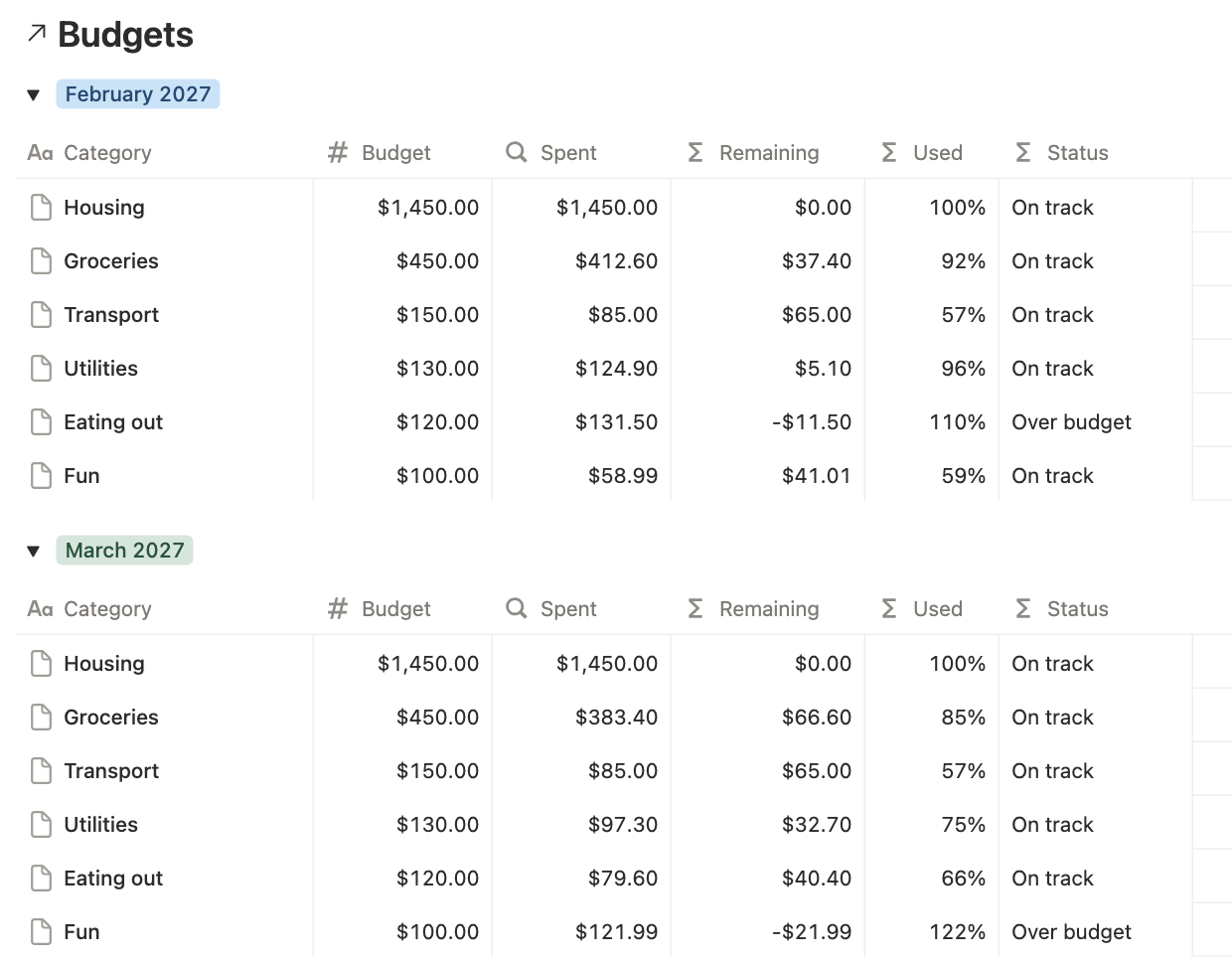
The Budget tracker view sits on the main page. It lists every category grouped by month, with the budget, the amount spent, what remains, the percentage used and a status.
It works as a budget tracker in Notion because the numbers come from your own transactions: each expense you link moves Spent up and Remaining down for that category and month. A category that goes over shows a negative Remaining and the status Over budget.
Budgets also has a Monthly view. It is a board with one column for each month and one card for each category, showing its budget, spent amount, remaining amount and status.
Use it to compare months side by side, or to plan next month by looking at where this month ended. Because each month has its own rows, you can raise or lower a category's budget from one month to the next without changing the past.
| Category | Budget | Spent | Remaining |
|---|---|---|---|
| Housing | $1,450.00 | $1,450.00 | $0.00 |
| Groceries | $450.00 | $383.40 | $66.60 |
| Transport | $150.00 | $85.00 | $65.00 |
| Utilities | $130.00 | $97.30 | $32.70 |
| Eating out | $120.00 | $79.60 | $40.40 |
| Fun | $100.00 | $121.99 | -$21.99 |
Fictional numbers. The six budgets total $2,400.00 and the 12 transactions total $2,217.29, leaving $182.71. Fun is over budget at 122% used. The template also includes February 2027, where Eating out went over by $11.50.
Notion suits you if you already keep notes and plans there and want your budget next to them, with views you can filter and regroup. A spreadsheet is better for long lists of transactions, yearly totals and custom formulas.
If you would rather use a spreadsheet, the free monthly budget for Google Sheets and Excel is linked below.
Yes. Duplicate it into your own Notion workspace at no cost. It works on Notion's free plan.
Yes. Add next month's budget rows before the month starts and it becomes a plan. As you log transactions, the same rows show how the month is going against that plan.
Yes. You need a Notion account to duplicate and use the template. A free account is enough.
No. Duplicating creates a separate private copy in your workspace. Nothing you type in it is shared with Fillfolio.
No. You add each transaction yourself. The template has no bank connection.
Yes. Categories are just the row names in Budgets. To change the currency, edit the number format of the Budget, Amount and Remaining properties in Notion.
The template uses fictional example data. Fillfolio is tracking software and does not provide financial, tax or legal advice.