Is this Notion expense tracker free?
Yes. Duplicate it into your own Notion workspace at no cost. It works on Notion's free plan.
Free Notion template
A Notion expense tracker, free to duplicate in one click. Log each expense with a date, a category and an amount, and Notion shows where the money went by category and by month.
It is one database with a chart and a monthly view on top, plus fictional example rows that show how it works. There is no sign-up on Fillfolio.
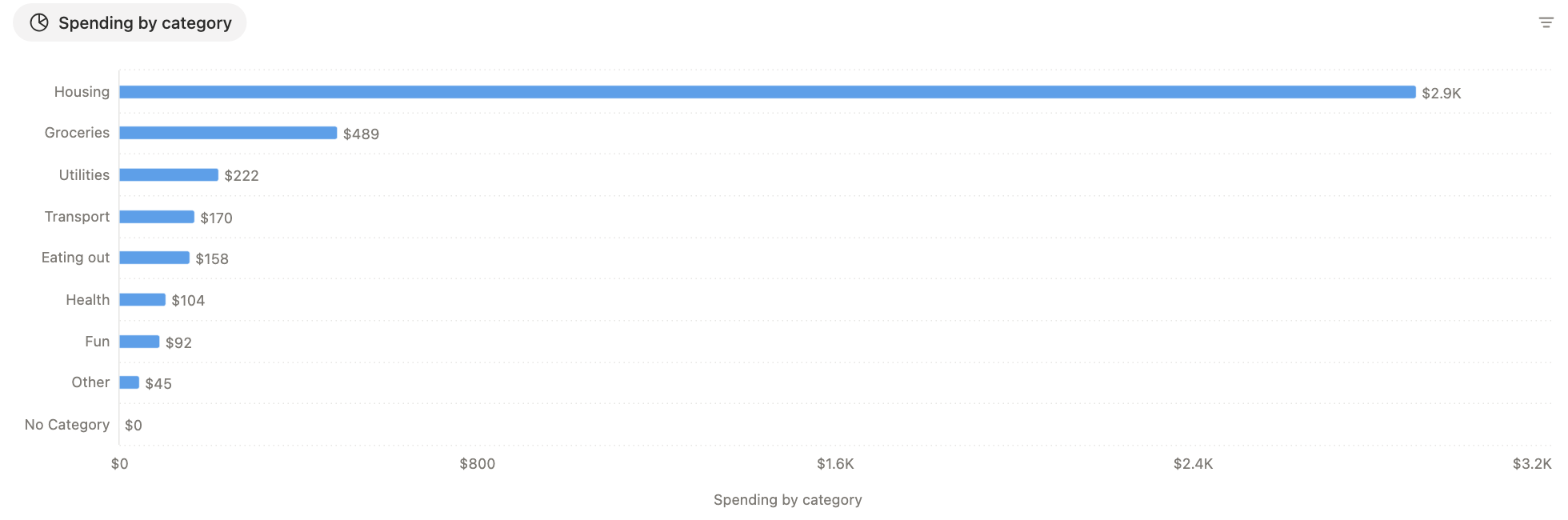
The template is one Notion page with one database, Expenses. Each row is an expense. Two views on the page read from it, so you only ever type in one place.
Open the template and choose Duplicate. Notion adds a private copy to your own workspace. Fillfolio cannot see your copy.
The rows in Expenses are fictional. Delete them before you add your own.
Open the Category property and rename, add or remove options until they match how you spend.
Add a row with the name, date, amount and category. Enter amounts as positive numbers.
The chart shows the total for each category. The By month view lists each month's expenses, newest first.
The Spending by category view is a bar chart at the top of the page. It adds up the Amount of every expense in each category and sorts the bars from largest to smallest, so the categories that take most of your money are the first thing you see.
To look at one month, add a filter on Month or Date to the chart. The template uses a single chart so that it works on Notion's free plan.
The By month view groups the same rows by month, with the newest expense first inside each month. Collapse the months you are done with and keep the current one open.
To see a month's total, hover over the bottom of the Amount column in that group and choose Calculate, then Sum. Notion remembers the choice in your copy.
| Category | February 2027 | March 2027 | Total |
|---|---|---|---|
| Housing | $1,450.00 | $1,450.00 | $2,900.00 |
| Groceries | $201.70 | $286.95 | $488.65 |
| Utilities | $124.90 | $97.30 | $222.20 |
| Transport | $85.00 | $85.00 | $170.00 |
| Eating out | $78.50 | $79.60 | $158.10 |
| Health | $0.00 | $103.75 | $103.75 |
| Fun | $28.00 | $64.00 | $92.00 |
| Other | $45.00 | $0.00 | $45.00 |
| Total | $2,013.10 | $2,166.60 | $4,179.70 |
Fictional numbers from the 19 example expenses. The chart rounds its labels, so Groceries shows as $489 and Housing as $2.9K.
Notion suits you if you already work there and want a quick log with a chart. A spreadsheet is better when you also track income, want month-by-month totals in one table, or have hundreds of rows a year.
The free expense tracker for Google Sheets and Excel is linked below, along with the Notion budget template if you want to set limits for each category.
Yes. Duplicate it into your own Notion workspace at no cost. It works on Notion's free plan.
It is built for expenses. To track income as well, add a Type property with Income and Expense options and filter the chart to Expense. For income and expenses side by side with a net figure, the spreadsheet expense tracker is the better fit.
No. Duplicating creates a separate private copy in your workspace. Nothing you type in it is shared with Fillfolio.
No. You add each expense yourself. The template has no bank connection.
Edit the Amount property in Notion and pick another number format. The chart follows it.
Add it as a negative amount in the same category as the purchase. It then reduces that category's total.
The template uses fictional example data. Fillfolio is tracking software and does not provide financial, tax or legal advice.