Is the printable budget template free?
Yes. Both PDFs, the Google Sheets copy, the Excel file and the Google Docs guide are free, with no sign-up.
Free PDFs + spreadsheet + Google Docs guide
A free printable budget template: a one-page monthly budget you download as a PDF, print and fill in by hand. It comes with a second page, a printable monthly bill tracker.
If you would rather type than write, the same two pages are a printable spreadsheet for your budget in Google Sheets and Excel. Type your numbers and the totals fill in, then print the finished page.
Save a personal copy and check Share settings before entering financial information. Remove the fictional examples before using your own values.
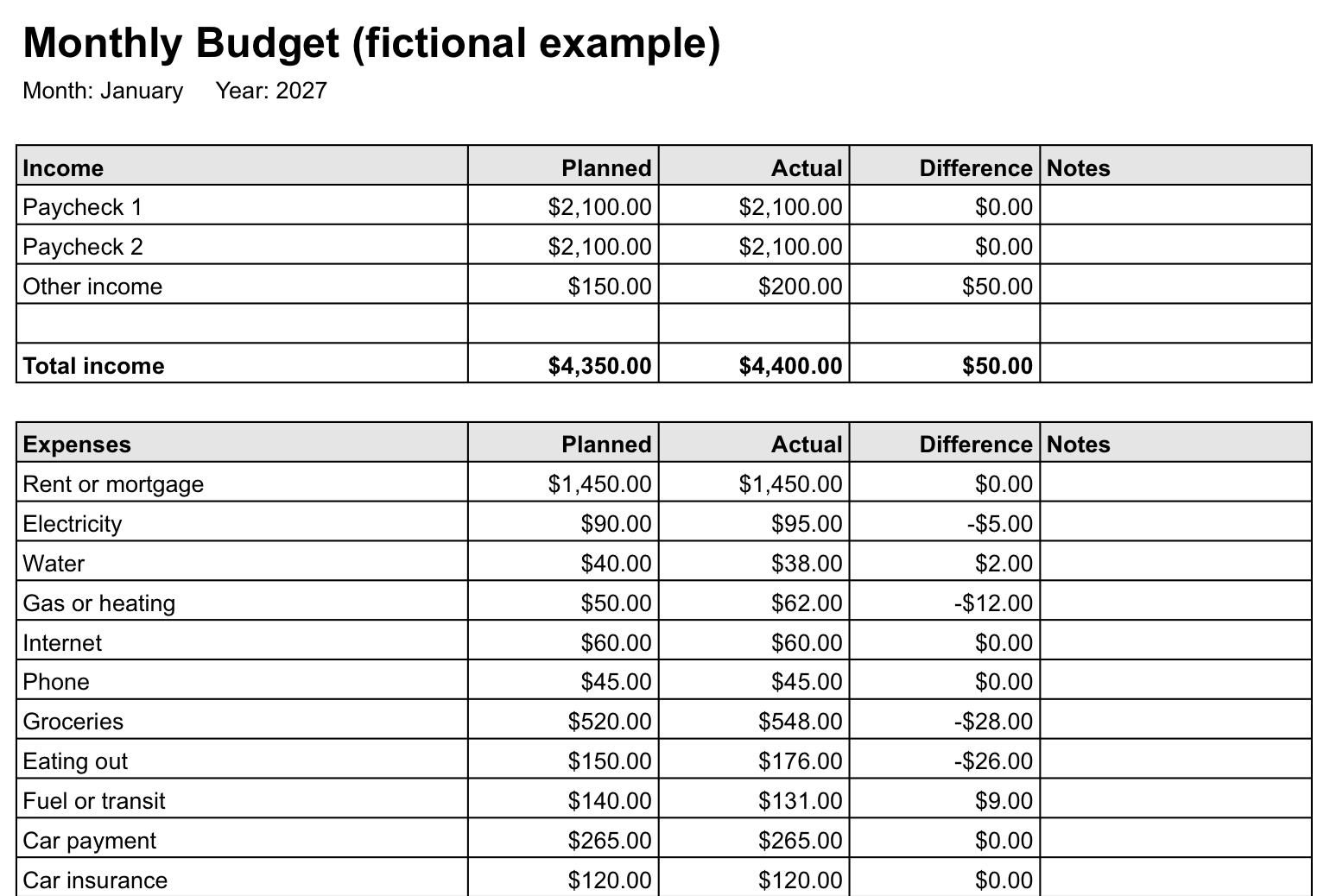
The monthly budget is one portrait page. At the top you write the month and year. Below are two tables: income, with room for two paychecks and other income, and expenses, with 20 common lines from rent to gifts and two empty rows for your own.
Each line has a Planned column, an Actual column and a Difference column, with a Notes column at the side. At the bottom you add up total income, total expenses and what is left over.
The second PDF is a free printable monthly bill tracker: one page for one month. It has 25 rows with columns for the bill, due date, amount, a Paid box, the date paid and notes, and a place at the bottom for the total, the amount paid and what is left to pay.
Print a fresh page each month and keep it where you pay your bills. For a version that colors overdue bills and keeps the whole year in one file, use the bill tracker spreadsheet linked below.
Download the monthly budget PDF and the bill tracker PDF. Print them in portrait on Letter or A4 paper. Each fits on one sheet.
At the start of the month, fill in the Planned column: what you expect to earn and what you plan to spend on each line. Cross out lines you do not use.
On the bill tracker, write every bill for the month with its due date and amount.
As the month goes on, write what you really spent in the Actual column and put an x in the Paid box for each bill you pay.
At the end of the month, total each column and work out the difference for each line and what is left over.
The Google Sheets copy and the Excel file hold the same two pages as tabs. Type a planned and an actual amount and the differences, totals and left-over amount fill in. On the bill tracker, type an x in the Paid column and the sheet works out what is left to pay.
You can rename any line to fit your own budget, then print the tab. The file has no macros and works in Excel 2019 or later, Microsoft 365 and other apps that read .xlsx files.
| Planned | Actual | |
|---|---|---|
| Total income | $4,350 | $4,400 |
| Total expenses | $3,965 | $3,986 |
| Left over | $385 | $414 |
| Bills for the month | Eight bills, $1,876 | Five paid, $1,685 |
| Bills left to pay | $191 |
Fictional numbers for January 2027, shown on the Example Budget and Example Bills tabs. Expenses came in $21 over plan, and income $50 over, so the month ended with $29 more left over than planned.
Yes. Both PDFs, the Google Sheets copy, the Excel file and the Google Docs guide are free, with no sign-up.
The PDFs are set up for Letter paper in portrait. They also print on A4 if you choose fit to page in the print dialog.
On paper, cross out a line and use the empty rows. In the Google Sheets or Excel version, type over any line name before you print.
The PDFs are made for printing and writing by hand. To type your numbers, use the Google Sheets copy or the Excel file, which add up the totals for you.
The bill tracker spreadsheet on this site marks bills as overdue or due soon as the days pass and keeps 12 months in one file. It does not connect to a bank; you mark bills as paid yourself.
The example tabs use fictional data. Fillfolio is tracking software and does not provide financial, tax or legal advice.