Is this weekly budget template free?
Yes. The Excel file, the Google Sheets copy and the Google Docs guide are free, with no sign-up.
Free spreadsheet + Google Docs guide
A free weekly budget template for Excel and Google Sheets. It takes your fixed bills off your income and turns what is left into one number: how much you can spend this week.
Then it tracks all 52 weeks of the year against that limit, with a running balance so a good week can cover a bad one. It comes with a Google Docs guide for a weekly review.
Save a personal copy and check Share settings before entering financial information. Remove the fictional examples before using your own values.
A weekly budget works well for the money you spend in small amounts: groceries, transport, eating out. You check one number once a week, not a list of categories every day.
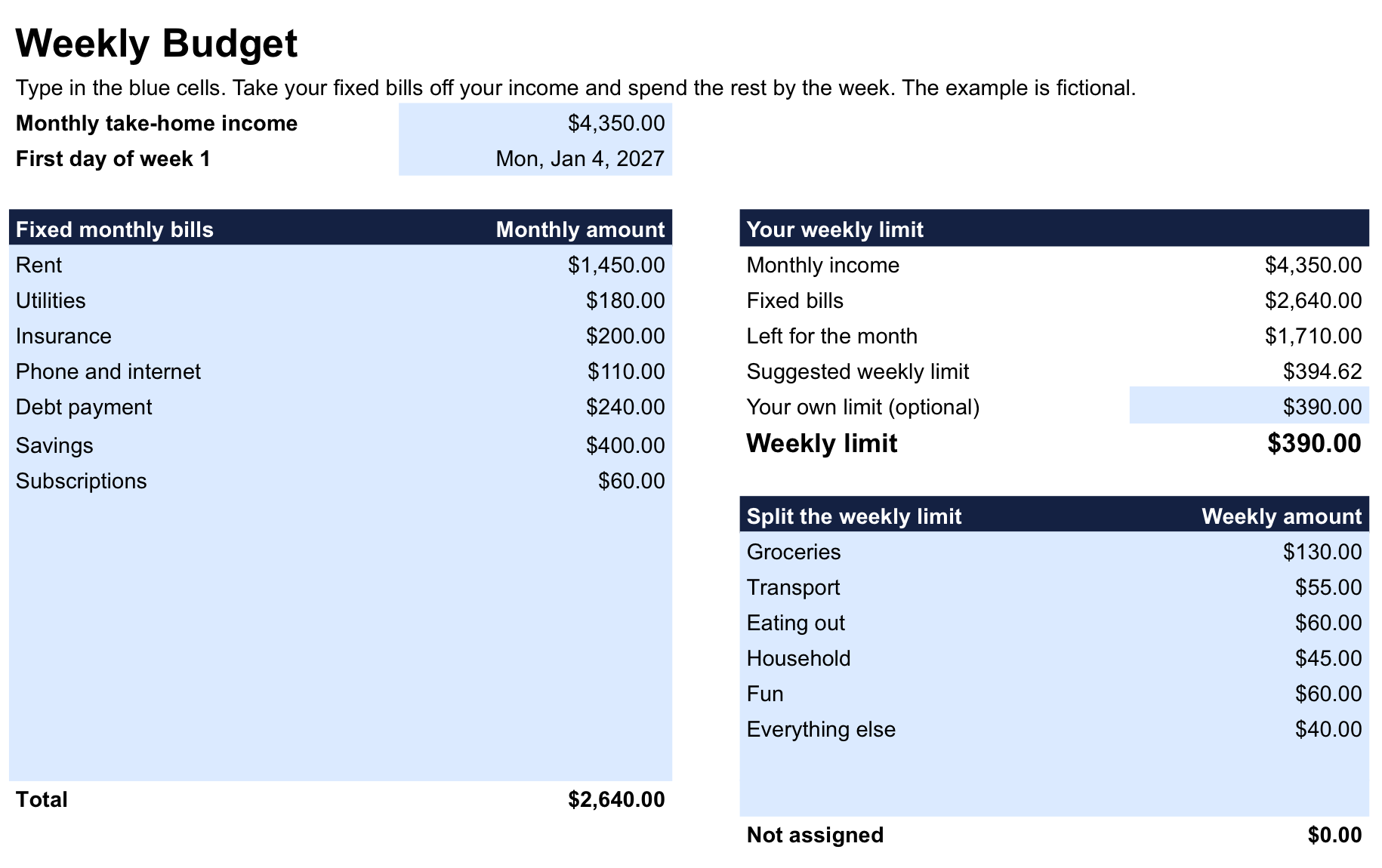
On the Weekly Limit tab you enter your monthly take-home income and your fixed monthly bills. The sheet subtracts the bills and suggests a weekly limit. You can keep it or type a rounder number of your own.
Use the copy button on this page, or download the Excel file. A Google Sheets copy is saved to your own Drive. Nothing you type is shared with Fillfolio.
On the Weekly Limit tab, type your monthly take-home income and replace the fictional bills with your own fixed monthly bills, including savings.
Read the suggested weekly limit. Keep it, or type your own in the cell below it.
Divide the limit across a few everyday categories. Not assigned shows what is left to give out.
On the 52 Weeks tab, type what you spent at the end of each week. Leave out the fixed bills: they are already taken off.
A positive running balance means the weeks so far are under the limit in total. A negative one means you have ground to make up.
A month is a little longer than four weeks. Dividing what is left each month by 4 would give a limit that only covers 48 weeks of the year. The template multiplies by 12 and divides by 52, so the limit holds for every week.
The first day of week 1 sets the dates. Enter a Monday, a Sunday or your payday, and the 52 Weeks tab lists each week from there.
| Monthly take-home income | $4,350 |
| Fixed monthly bills | $2,640, including $400 of savings |
| Left for the month | $1,710 |
| Suggested weekly limit | $394.62 |
| Weekly limit used | $390 |
| After six weeks | $2,299.50 spent against $2,340: $40.50 under the limit |
Fictional numbers for 2027. Two of the six weeks went over the limit, by $11.15 and $30.30, and the other four made up for it.
The Excel download is the same workbook saved as an .xlsx file, with the same tabs, formulas, color rules and fictional example. It has no macros. It needs Excel 2019 or later, or Microsoft 365, and also opens in other spreadsheet apps that read .xlsx files.
Yes. The Excel file, the Google Sheets copy and the Google Docs guide are free, with no sign-up.
Everyday spending that varies: groceries, transport, eating out, household items and fun. Fixed bills such as rent and insurance are taken off first and are not counted week by week.
Multiply your weekly pay by 52 and divide by 12 to get a monthly figure for the income cell. The weekly limit then lines up with your paychecks.
It shows in the running balance. You can let it cover a later week that goes over, or move it to savings and start again from zero.
Yes, but the new limit applies to every week on the 52 Weeks tab, including past ones. Note your running balance before you change it.
Yes. The Excel file has the same tabs and formulas as the Google Sheets copy and uses no macros.
The template uses fictional example data. Fillfolio is tracking software and does not provide financial, tax or legal advice.